CMMS software for retail chains.
Pebble keeps every store’s equipment, repairs, preventative maintenance and service providers in one place, so a lighting outage or a broken automatic door becomes a tracked work order with the right provider on it.
How a retail chain runs on Pebble
- Load your stores and equipmentRooftop units, lighting, doors, signage and fire and life safety equipment each get their own record.
- Report it from the storeA store manager opens a ticket, or scans the QR label on the unit.
- Send it to the right providerThe job goes to a provider who covers that trade and location, with your DNE on it.
- Keep the historyEvery visit, part and invoice stays on the unit and the store.
Built around the work that keeps stores open.
HVAC and refrigeration on a schedule
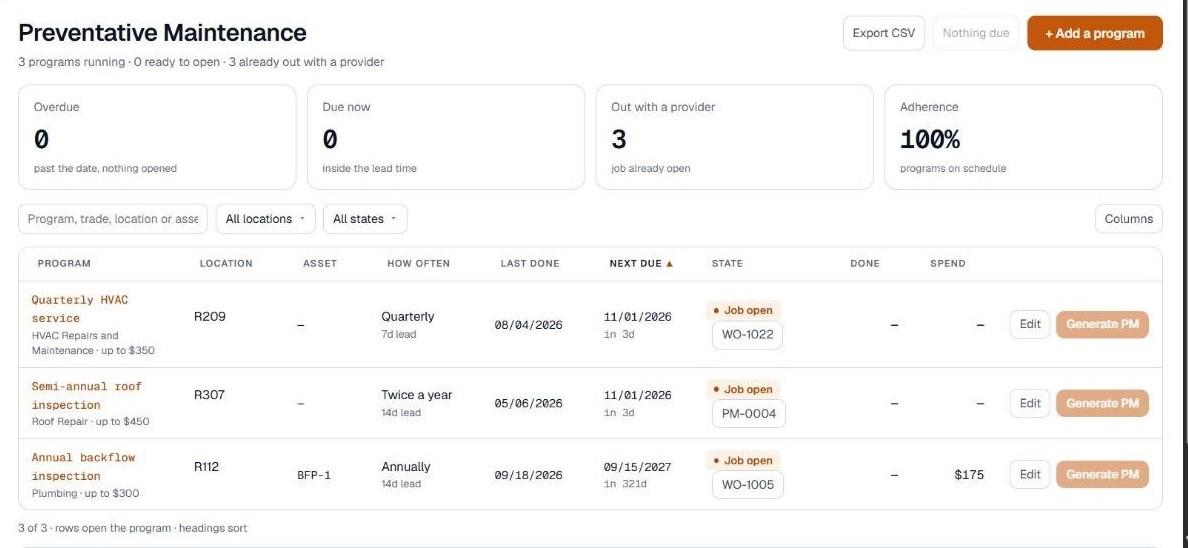
Filters, coil cleaning and yearly tune-ups are easy to miss across many stores. Set recurring maintenance by trade, asset or location, and Pebble opens the work order when each cycle comes due.
Every unit on file
Track make, model, serial number, install date and warranty for rooftop units, panels, doors and other equipment, with its full service history.
Warranty checked before dispatch
Warranty status is visible before a repair goes out, so you are not paying for work that may still be covered.
Store managers report it directly
Managers open a ticket from the store or scan the QR label on the unit. Someone on your team reviews it and turns it into a work order.
Priorities that match the store
Set response targets by priority, and flag emergencies when the location cannot operate, so a store that cannot open gets handled first.
Your providers, with spend kept in check
Electrical, HVAC and door providers get their own portal at no cost to them. Quotes over your DNE wait for your approval, and spend is reported by location and trade.
Works however you run Pebble.
Pebble runs three ways, and you can choose the model that fits each trade and location.
Client-Managed
Your team runs the program in Pebble with your own service providers.
Shared Coverage
Bedrock fills the gaps in your network where you need coverage.
Managed Services
Bedrock manages dispatch and service for you, in the same system.
Want Bedrock to run the repairs too? See facility maintenance for retail
What is a CMMS for retail?
A CMMS is software that keeps work orders, equipment, preventative maintenance, service providers and invoices in one place. For a retail chain, that means every store’s HVAC, lighting, doors and signage has its own record and service history.
Can store managers report problems themselves?
Yes. A manager can open a ticket from the store or scan the QR label on a unit. Someone on your team reviews the ticket and turns it into a work order.
Can we keep our own electrical and HVAC providers?
Yes. Your providers stay yours and get their own portal at no cost to them. Where you do not have coverage, Bedrock can fill the gaps.
Can Pebble schedule HVAC tune-ups and filter changes?
Any recurring service can be set up as a maintenance program by trade, asset or location. Pebble opens the work order on the interval you set.