How do you track provider insurance, W-9s and rate cards in Pebble?
In short
- The counters at the top of Service Providers show expired COIs, COIs expiring within 30 days, missing COIs, missing W-9s and missing rate cards.
- Click a counter to see only those providers.
- Pebble warns you when a provider on open work has no current certificate, and when you pick one with no COI on a new work order.
- Providers on the portal can upload their own certificate and W-9. Every client they work for sees the new file and date.
Where do you see what’s missing?
Go to Service Providers. The row of counters at the top shows how many providers have:
- COI expired
- COI expiring ≤30 days
- no COI on file
- missing W-9
- no rate card
Click any counter to filter the list to those providers. Click Show all to clear it.

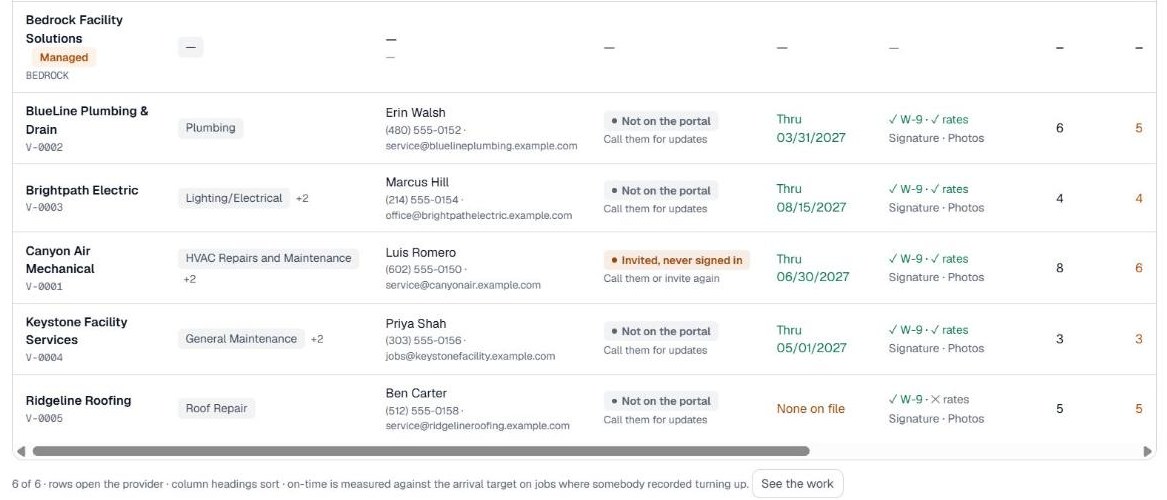
Reading the Insurance and Paperwork columns
- Insurance shows the certificate date: Thru a date when it’s current, the number of days left when it runs out within 30 days, Expired with the date, or None on file.
- Paperwork shows a check or a cross for the W-9 and rates, any licenses on file, and whether you require a signature and photos at each visit.
- When the provider uploaded the file themselves, a View link opens it.
What warnings does Pebble give?
- If a provider is on open work without a current certificate of insurance, a red box at the top of Service Providers names them and says to get the certificate before the next visit, or move the work.
- When you open a work order, any provider with no certificate on file shows (no COI) next to their name in the Send to list.
How do you update the paperwork yourself?
Open the provider and go to Paperwork. Tick Certificate of insurance on file and enter the COI expiration date, or tick W-9 on file or Rate card on file. Click Save.
Keep the insurance date current. It’s what the counters and warnings read.
Can providers upload their own documents?
Yes, once they’re on the Provider Portal. Under Documents in the portal, a provider’s Admin or Billing person uploads:
- Their certificate of insurance, with the date it expires
- Their W-9
- Any licenses, with the date each one expires
- Other documents, such as a safety program or certifications
A new certificate or W-9 replaces the one on file. Every client the provider works for sees the new file and its date, and the old one stays in the history. Uploading a certificate also updates the expiry date on your provider record.
Pebble emails the provider 30 days and 7 days before a certificate or license runs out, and on the day it expires.
Related help
Bedrock Facility Solutions
Screens are from a demo account with made-up data.
Published 29 October 2026. Last reviewed 29 October 2026.