How do you sign in to Pebble?
In short
- Go to pebble.bedrockfms.com/login.
- Sign in with your work email and password, or click Sign in with Microsoft if your account uses it.
- No password? Choose Use a one-time link instead and Pebble emails you a link.
- Forgot it? Choose Forgot password? and a reset link is emailed to you.
Where do you sign in?
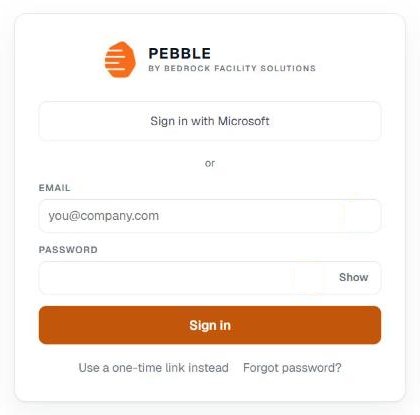
Open pebble.bedrockfms.com/login in your browser. The page shows three ways in: Microsoft, a password, or a one-time link.
Your first sign-in, from an invitation
Someone on your account invites you from the Team page. You get an email, and opening it signs you in and asks you to choose a password.
- Type it under New password and again under Confirm password. It needs at least 12 characters. A few ordinary words together beats one short word with symbols in it.
- Click Save password and continue.
- You can skip the password and use one-time links instead.
Invitation links work once and for a short time. If yours has expired, go to the sign-in page, choose Forgot password?, and a fresh link is emailed to you.
Pebble never emails you a password, and nobody at Bedrock can see the one you choose.
Signing in with a password
- Type your work email under Email and your password under Password.
- Click Show if you want to check what you typed.
- Click Sign in.
Signing in with Microsoft
If you see Sign in with Microsoft, you can use your company Microsoft account instead of a password. Use the Microsoft account with the same email as your Pebble invitation.
If Microsoft sign-in does not go through, Pebble says so at the top of the page. You can still sign in with your email below.
Signing in with a one-time link
- Click Use a one-time link instead.
- Type your email and click Email me a link.
- Open the email and click the link. It signs you in.
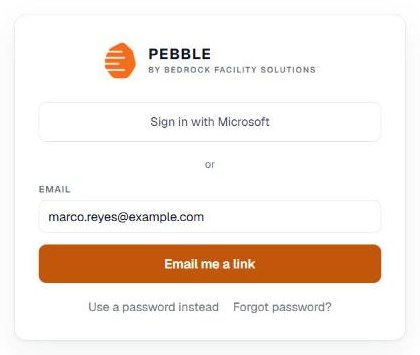
If the link has expired or was already used, Pebble tells you on the sign-in page. Request a new one.
If you forget your password
- Click Forgot password? on the sign-in page.
- Type your email and click Email me a reset link.
- Open the email and choose a new password. The link works once, and it expires.
Why were you signed out?
- Your session ended. Sign in again and you land back where you were. Anything you had typed and not saved is gone.
- Your access to this account was removed. If you think this is a mistake, ask an administrator on the account.
Related help
Bedrock Facility Solutions
Screens are from a demo account with made-up data.
Published 29 October 2026. Last reviewed 29 October 2026.