What does each work order status mean in Pebble?
In short
- Every job starts at Received and ends at Complete, Closed or Canceled.
- The provider moves most of the middle statuses from their side.
- Your team moves the decisions: dispatching, quotes, checking the work, invoices and payment.
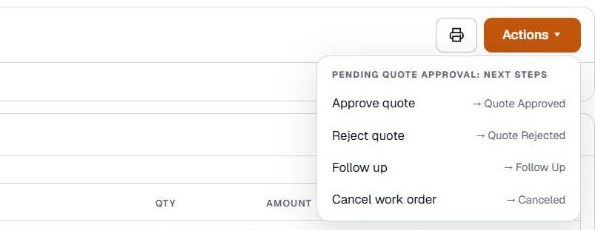
- Click Actions on a job to see what you can do next.
Where do you see the status?
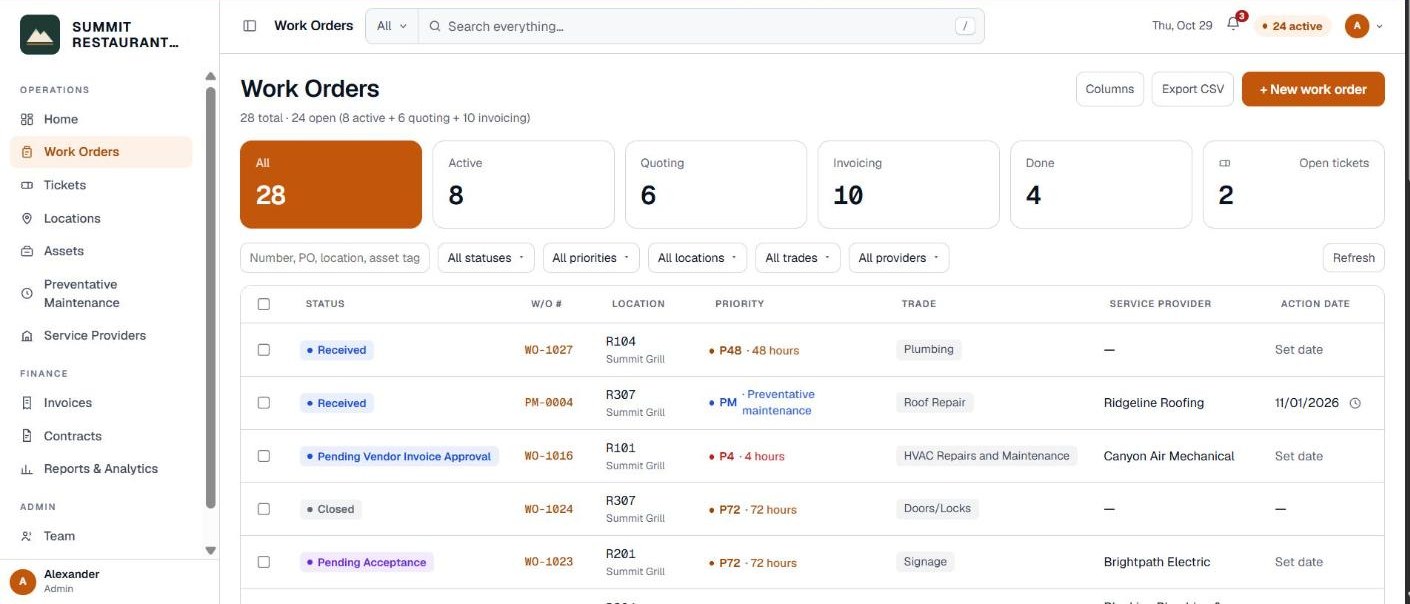
The status shows next to the job number at the top of every work order, and in the Status column on the Work Orders page. You can filter the list by status with the All statuses filter.
To move a job on, click Actions at the top right of the job. The menu shows the current status and its next steps. Steps that are the provider’s show under What happens next, and there is nothing for you to press.
Sending the job out
| Status | What it means | Who moves it on |
|---|---|---|
| Received | The job is logged and waiting to be dispatched. | Your team dispatches it |
| Pending Acceptance | Sent to the provider. Waiting for them to accept. | The provider |
| Vendor Accept - Pending ETA | The provider accepted the job and has not given a date yet. | The provider |
| Vendor Reject | The provider declined. Pick a new provider and send it again. | Your team |
| Waiting to be Scheduled | Accepted, but no ETA yet. | The provider |
While the work is happening
| Status | What it means | Who moves it on |
|---|---|---|
| In Progress | The ETA is set and the work is live. | The provider |
| OnSite | A technician is on site. | The provider |
| Follow Up | A return visit is needed. | The provider or your team |
| Waiting on Materials | Waiting for parts or materials. | The provider |
| Verify Work Completion | The provider says the work is done. Check it before it is invoiced. | Your team |
Quotes
| Status | What it means | Who moves it on |
|---|---|---|
| Pending Quote | The repair will go over the DNE, so a quote is needed. | The provider |
| Pending Quote Approval | The quote is in and waiting on you. | Your team |
| Quote Approved | You approved the quote. Work can go ahead. | The provider |
| Quote Rejected | You declined the quote. | Your team |
| Quote Rejected Incurred | The work will not go ahead, but some charges were already incurred. | Your team |
Our guide on quotes, invoices and your DNE covers this part in more detail.
Invoices and payment
| Status | What it means | Who moves it on |
|---|---|---|
| Pending Vendor Invoice | The work is checked and the provider can invoice. | The provider |
| Pending Vendor Invoice Approval | The invoice is in and waiting on you. | Your team |
| Invoice Approved | You approved the invoice and it is ready for payment. | Your team |
| Invoice Rejected | You sent the invoice back to the provider to fix. | The provider |
| Vendor Payment Processing | Payment is being processed. | Your team |
| Paid | The provider has been paid. | Your team |
How a job ends
| Status | What it means | Who moves it on |
|---|---|---|
| Complete | Closed successfully. | Finished |
| Closed | Closed by your team. | Finished |
| Canceled | Canceled. | Finished |
Canceling or closing needs the Cancel or close work permission, and Pebble asks before it does it. A job that has an unpaid invoice on it cannot be canceled or closed, except by an administrator.
Related help
Bedrock Facility Solutions
Screens are from a demo account with made-up data.
Published 29 October 2026. Last reviewed 29 October 2026.